11/01/2013

[Date Formatting] Java Default Engine AND Joda framework

A formatting string describes how date/time values should be read and written from(to) string representation

Now we compare the two kinds of formatting engines.
Engine
Formatter
Thread-safe?
Description
Example
Java
SimpleDateFormat

NO
Standard Java date implementation. Provides lenient, error-prone and full-featured parsing and writing. It has moderate speed and is generally a good choice unless you need to work with large quantities of date/time fields. For advanced study please refer to Java SimpleDateFormat documentation.
yyyy-MM-dd HH:mm:ss
Joda
DateTimeFormat
DateTimeFormatter

YES
An improved third-party date library. Joda is stricter on input data accuracy when parsing and does not work well with time zones. It does, however, provide a 20-30% speed increase compared to standard Java. For further reading please visit the project site at http://joda-time.sourceforge.net).
Joda may be convenient for AS/400 machines.
On the other hand, Joda is unable to read time zone expressed with any number of z letters and/or at least three Z letters in a pattern.
yyyy-MM-dd HH:mm:ss


****************************
Java Default:
****************************

1.1 Date Format Pattern Syntax (Java)
Letter
Date or Time Component
Presentation
Examples
G
Era designator
Text
AD
Y
Year
Year
1996; 96
M
Month in year
Month
July; Jul; VII; 07; 7
w
Week in year
Number
27
W
Week in month
Number
2
D
Day in year
Number
189
d
Day in month
Number
10
F
Day of week in month
Number
2
E
Day in week
Text
Tuesday; Tue
a
Am/pm marker
Text
PM
H
Hour in day (0-23)
Number
0
k
Hour in day (1-24)
Number
24
K
Hour in am/pm (0-11)
Number
0
h
Hour in am/pm (1-12)
Number
12
m
Minute in hour
Number
30
s
Second in minute
Number
55
S
Millisecond
Number
970
z
Time zone
General time zone
Pacific Standard Time; PST; GMT-08:00
Z
Time zone
RFC 822 time zone
-0800
'
Escape for text/id
Delimiter
(none)
''
Single quote
Literal
'

The number of symbol letters you specify also determines the format. For example, if the "zz" pattern results in "PDT", then the "zzzz" pattern generates "Pacific Daylight Time". The following table summarizes these rules:

1.2 Rules for Date Format Usage (Java)
Presentation
Processing
Number of Pattern Letters
Form
Text
Formatting
1 - 3
short or abbreviated form, if one exists
Text
Formatting
>= 4
full form
Text
Parsing
>= 1
both forms
Year
Formatting
2
truncated to 2 digits
Year
Formatting
1 or >= 3
interpreted as Number.
Year
Parsing
1
intepreted literally
Year
Parsing
2
interpreted relative to the century within 80 years before or 20 years after the time when theSimpleDateFormat instance is created
Year
Parsing
>= 3
intepreted literally
Month
Both
1-2
interpreted as a Number
Month
Parsing
>= 3
interpreted as Text (using Roman numbers, abbreviated month name - if exists, or full month name)
Month
Formatting
3
interpreted as Text (using Roman numbers, or abbreviated month name - if exists)
Month
Formatting
>= 4
interpreted as Text (full month name)
Number
Formatting
minimum number of required digits
shorter numbers are padded with zeros
Number
Parsing
number of pattern letters is ignored (unless needed to separate two adjacent fields)
any form
General time zone
Both
1-3
short or abbreviated form, if has a name. Otherwise, GMT offset value (GMT[sign][[0]0-23]:[00-59])
General time zone
Both
>= 4
full form, , if has a name. Otherwise, GMT offset value (GMT[sign][[0]0-23]:[00-59])
General time zone
Parsing
>= 1
RFC 822 time zone form is allowed
RFC 822 time zone
Both
>= 1
RFC 822 4-digit time zone format is used ([sign][0-23][00-59])
RFC 822 time zone
Parsing
>= 1
General time zone form is allowed

Examples:

1.3 Date and Time Format Patterns and Results (Java)
Date and Time Pattern
Result
"yyyy.MM.dd G 'at' HH:mm:ss z"
2001.07.04 AD at 12:08:56 PDT
"EEE, MMM d, ''yy"
Wed, Jul 4, '01
"h:mm a"
12:08 PM
"hh 'o''clock' a, zzzz"
12 o'clock PM, Pacific Daylight Time
"K:mm a, z"
0:08 PM, PDT
"yyyyy.MMMMM.dd GGG hh:mm aaa"
02001.July.04 AD 12:08 PM
"EEE, d MMM yyyy HH:mm:ss Z"
Wed, 4 Jul 2001 12:08:56 -0700
"yyMMddHHmmssZ"
010704120856-0700
"yyyy-MM-dd'T'HH:mm:ss.SSSZ"
2001-07-04T12:08:56.235-0700

****************************
JODA:
****************************
2.1 Date Format Pattern Syntax (Joda)
Symbol
Meaning
Presentation
Examples
G
Era designator
Text
AD
C
Century of era (>=0)
Number
20
Y
Year of era (>=0)
Year
1996
y
Year
Year
1996
x
Week of weekyear
Year
1996
M
Month of year
Month
July; Jul; 07
w
Week of year
Number
27
D
Day of year
Number
189
d
Day of month
Number
10
e
Day of week
Number
2
E
Day of week
Text
Tuesday; Tue
a
Halfday of day
Text
PM
H
Hour of day (0-23)
Number
0
k
Clockhour of day (1-24)
Number
24
K
Hour of halfday (0-11)
Number
0
h
Clockhour of halfday (1-12)
Number
12
m
Minute of hour
Number
30
s
Second of minute
Number
55
S
Fraction of second
Number
970
z
Time zone
Text
Pacific Standard Time; PST
Z
Time zone offset/id
Zone
-0800; -08:00; America/Los_Angeles
'
Escape for text/id
Delimiter
(none)
''
Single quote
Literal
'

We can see from above table, although actual format strings for Java and Joda are almost 100% compatible with each other, still there are differences. The 'F' in default java is not supported in Joda.

Basically, 'F' means 'Day of week in month', for example, '2013-11-8' is the second friday in Nov of 2013, so 'F' will get 2 as result. While 'E' means 'Day of week' only, with the same example, '2013-11-8', 'E' will get 5 as result, because it's Friday, the fifth day in the week.

The number of symbol letters you specify also determines the format. The following table summarizes these rules:

2.2 Rules for Date Format Usage (Joda)
Presentation
Processing
Number of Pattern Letters
Form
Text
Formatting
1 - 3
short or abbreviated form, if one exists
Text
Formatting
>= 4
full form
Text
Parsing
>= 1
both forms
Year
Formatting
2
truncated to 2 digits
Year
Formatting
1 or >= 3
interpreted as Number.
Year
Parsing
>= 1
intepreted literally
Month
Both
1-2
interpreted as a Number
Month
Parsing
>= 3
interpreted as Text (using Roman numbers, abbreviated month name - if exists, or full month name)
Month
Formatting
3
interpreted as Text (using Roman numbers, or abbreviated month name - if exists)
Month
Formatting
>= 4
interpreted as Text (full month name)
Number
Formatting
minimum number of required digits
shorter numbers are padded with zeros
Number
Parsing
>= 1
any form
Zone name
Formatting
1-3
short or abbreviated form
Zone name
Formatting
>= 4
full form
Time zone offset/id
Formatting
1
Offset without a colon between hours and minutes
Time zone offset/id
Formatting
2
Offset with a colon between hours and minutes
Time zone offset/id
Formatting
>= 3
Full textual form like this: "Continent/City"
Time zone offset/id
Parsing
1
Offset without a colon between hours and minutes
Time zone offset/id
Parsing
2
Offset with a colon between hours and minutes


For more details, the official docs are the best place to go.

Reference:
Micosoft: StandardDate and Time Format Strings


10/31/2013

Java-Path Topic 1 =>Get resource based on classpath [ this.getClass().getResource() AND this.getClass().getClassLoader().getResource() ]

For java developers, must be very familar to these two methods, 'this.getClass().getResource()' and 'this.getClass().getClassLoader().getResource()'.

For new comers, one most frustrating issue is 'The file is obviously there, but the code just can't find it...Damn it. :) '.

Based on the daily work and study, I have a feeling that, to have a good understanding of how things works can help a lot when you want to use those things.

High buildings are always built on firm foundations. Just take some time to read the doc or source code when you have doubts. All the daily accumulations will contribute to better understanding. OK, stop all the craps.

To get resources based on classpath, there are basically three ways:
URL url = this.getClass().getResource("resource_name");

URL url = this.getClass().getClassLoader().getResource("resource_name");

URL url = Thread.currentThread().getContextClassLoader().getResource("resource_name");


The 1st one,

URL url = this.getClass().getResource("resource_name");

This is to get resource based on current class instance. But, if we check the source code of this method, we'll see that actually we still get the resource using classloader.

/**
     * Finds a resource with a given name.  The rules for searching resources
     * associated with a given class are implemented by the defining
     * {@linkplain ClassLoader class loader} of the class.  This method
     * delegates to this object's class loader.  If this object was loaded by
     * the bootstrap class loader, the method delegates to {@link
     * ClassLoader#getSystemResource}.
     *
     * <p> Before delegation, an absolute resource name is constructed from the
     * given resource name using this algorithm:
     *
     * <ul>
     *
     * <li> If the <tt>name</tt> begins with a <tt>'/'</tt>
     * (<tt>'&#92;u002f'</tt>), then the absolute name of the resource is the
     * portion of the <tt>name</tt> following the <tt>'/'</tt>. 
     *
     * <li> Otherwise, the absolute name is of the following form:
     *
     * <blockquote><pre>
     *   <tt>modified_package_name</tt>/<tt>name</tt>
     * </pre></blockquote>
     *
     * <p> Where the <tt>modified_package_name</tt> is the package name of this
     * object with <tt>'/'</tt> substituted for <tt>'.'</tt>
     * (<tt>'&#92;u002e'</tt>).
     *
     * </ul>
     *
     * @param  name name of the desired resource
     * @return      A  {@link java.net.URL} object or <tt>null</tt> if no
     *              resource with this name is found
     * @since  JDK1.1
     */
    public java.net.URL getResource(String name) {
        name = resolveName(name);
        ClassLoader cl = getClassLoader0();
        if (cl==null) {
            // A system class.
            return ClassLoader.getSystemResource(name);
        }
        return cl.getResource(name);
    }

And, in the resolveName(name) method:
/**
     * Add a package name prefix if the name is not absolute Remove leading "/"
     * if name is absolute
     */
    private String resolveName(String name) {
        if (name == null) {
            return name;
        }
        if (!name.startsWith("/")) {
            Class c = this;
            while (c.isArray()) {
                c = c.getComponentType();
            }
            String baseName = c.getName();
            int index = baseName.lastIndexOf('.');
            if (index != -1) {
                name = baseName.substring(0, index).replace('.', '/')
                    +"/"+name;
            }
        } else {
            name = name.substring(1);
        }
        return name;
    }

Based on these, we can have the conclusion that:

*****
1. If the passed in resource name is starting with slash '/', the input path is relative to the classpath.

Attention: If you are running a test case, and if the test classpath have exactly the same resource with the main classpath, then the one on the test classpath will be used. If the test classpath does not have the resource, the main classpath will be used.


2. If the passed in resource name does not start with slash '/'. Then the method resolveName will add the package to the path. So in this case, the path is relative to current package path.
*****

Example:

package com.test;

import java.io.IOException;
import java.io.InputStream;
import java.util.Properties;

import org.junit.Test;

public class PathTest {

    @Test
    public void test() {
        
        
        System.out.println("For=> this.getClass().getResource");
        
        String path = "test.properties";
        System.out.println("'"+path+"' => "+this.getClass().getResource(path));
        InputStream in = this.getClass().getResourceAsStream(path);
        System.out.println("Property Version => " + loadFile(in));
        
        path = "/com/test/test.properties";
        System.out.println("'"+path+"' => "+this.getClass().getResource(path));
        in = this.getClass().getResourceAsStream(path);
        System.out.println("Property Version => " + loadFile(in));
        
        path = "/test/test.properties";
        System.out.println("'"+path+"' => "+this.getClass().getResource(path));
        in = this.getClass().getResourceAsStream(path);
        System.out.println("Property Version => " + loadFile(in));
        
        path = "";
        System.out.println("'"+path+"' => "+this.getClass().getResource(path));
        
        path = "/";
        System.out.println("'"+path+"' => "+this.getClass().getResource(path));
        
        path = "/test";
        System.out.println("'"+path+"' => "+this.getClass().getResource(path));
        
        path = "/non-test";
        System.out.println("'"+path+"' => "+this.getClass().getResource(path));
        
        path = "/non-test-emptyfolder";
        System.out.println("'"+path+"' => "+this.getClass().getResource(path));
        
        path = "test-emptyfolder";
        System.out.println("'"+path+"' => "+this.getClass().getResource(path));
        
        path = "/test-emptyfolder";
        System.out.println("'"+path+"' => "+this.getClass().getResource(path));
        
        
    }
    
    public String loadFile(InputStream in){
        
        Properties prop = new Properties();
        try {
            prop.load(in);
            return (String) prop.get("test.version");
        } catch (IOException e) {
            e.printStackTrace();
        }
        return null;
    }

}
Output:
For=> this.getClass().getResource
'test.properties' => file:/C:/stsworkspace/test-code/target/classes/com/test/test.properties
Property Version => 5.0(src/main/java/come.test/test.properties)
'/com/test/test.properties' => file:/C:/stsworkspace/test-code/target/classes/com/test/test.properties
Property Version => 5.0(src/main/java/come.test/test.properties)
'/test/test.properties' => file:/C:/stsworkspace/test-code/target/classes/test/test.properties
Property Version => 1.0(src/main/resources/test.properties)
'' => file:/C:/stsworkspace/test-code/target/test-classes/com/test/
'/' => file:/C:/stsworkspace/test-code/target/test-classes/
'/test' => file:/C:/stsworkspace/test-code/target/test-classes/test
'/non-test' => file:/C:/stsworkspace/test-code/target/classes/non-test
'/non-test-emptyfolder' => null
'test-emptyfolder' => null
'/test-emptyfolder' => null

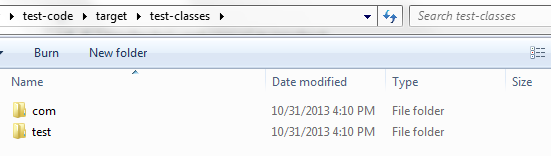
Above is the result when we run in IDE, but if we run the test case using maven, there will be problem. Because, when maven do the packaging, by default it'll remove all the non-class files in the package because it expects you to put all the resources under src/main/resources. Also, it'll ignore all the empty folders under resources.

After we package the project:

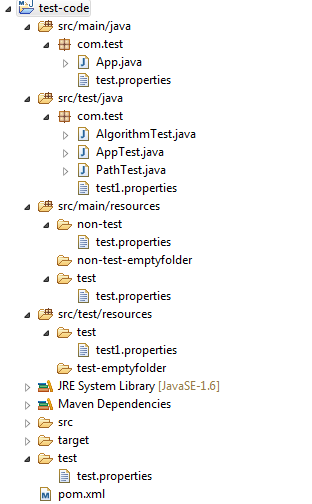
In the target folder we can see that:
Inside classes folder:
Inside test-classes folder:

==========================================Beautiful Line Break======================================

The 2nd one,
URL url = this.getClass().getClassLoader().getResource("resource_name");

This is to get the resource using classloader. By looking into the source code, we can see that it'll go all the way up to get the parent class loader. Regarding the classloader part, I'll not include details now, I still more research on the basic JVM knowledge.

/**
     * Finds the resource with the given name.  A resource is some data
     * (images, audio, text, etc) that can be accessed by class code in a way
     * that is independent of the location of the code.
     *
     * <p> The name of a resource is a '<tt>/</tt>'-separated path name that
     * identifies the resource.
     *
     * <p> This method will first search the parent class loader for the
     * resource; if the parent is <tt>null</tt> the path of the class loader
     * built-in to the virtual machine is searched.  That failing, this method
     * will invoke {@link #findResource(String)} to find the resource.  </p>
     *
     * @param  name
     *         The resource name
     *
     * @return  A <tt>URL</tt> object for reading the resource, or
     *          <tt>null</tt> if the resource could not be found or the invoker
     *          doesn't have adequate  privileges to get the resource.
     *
     * @since  1.1
     */
    public URL getResource(String name) {
    URL url;
    if (parent != null) {
        url = parent.getResource(name);
    } else {
        url = getBootstrapResource(name);
    }
    if (url == null) {
        url = findResource(name);
    }
    return url;
    }

Attention:

 If one class is loaded by bootstrap loader, then sometimes it'll return null when we get the classloader. For example, if we use 'new Object().getClass().getClassLoader()', it may return null. If we use this classloader to load resource, it'll throw null pointer exception. So to make it safe, we better use 'this.getClass().getClassLoader()'.

Normally if we don't specify special classloader in our project. The class that we write ourselves will be loaded using 'ClassLoader.getSystemClassLoader()'.

*****
So, in the second way, the resource path that passed in should be relative to the classpath.
And it does not support absolute path.

Attention: If you are running a test case, and if the test classpath have exactly the same resource with the main classpath, then the one on the test classpath will be used. If the test classpath does not have the resource, the main classpath will be used.
*****

Example:

System.out.println();
        System.out.println("For=> this.getClass().getClassLoader().getResource");
        
        path = "test/test.properties";
        System.out.println("'"+path+"' => "+this.getClass().getClassLoader().getResource(path));
        in = this.getClass().getClassLoader().getResourceAsStream(path);
        System.out.println("Property Version => " + loadFile(in));
        
        path = "com/test/test.properties";
        System.out.println("'"+path+"' => "+this.getClass().getClassLoader().getResource(path));
        in = this.getClass().getClassLoader().getResourceAsStream(path);
        System.out.println("Property Version => " + loadFile(in));
        
        path = "com/test/test.properties";
        System.out.println("'"+path+"' => "+this.getClass().getClassLoader().getResource(path));
        in = this.getClass().getClassLoader().getResourceAsStream(path);
        System.out.println("Property Version => " + loadFile(in));
        
        path = "";
        System.out.println("'"+path+"' => "+this.getClass().getClassLoader().getResource(path));
        
        path = "/";
        System.out.println("'"+path+"' => "+this.getClass().getClassLoader().getResource(path));
        
        path = "test";
        System.out.println("'"+path+"' => "+this.getClass().getClassLoader().getResource(path));
        
        path = "/test";
        System.out.println("'"+path+"' => "+this.getClass().getClassLoader().getResource(path));
        
        path = "non-test";
        System.out.println("'"+path+"' => "+this.getClass().getClassLoader().getResource(path));
        
        path = "/non-test";
        System.out.println("'"+path+"' => "+this.getClass().getClassLoader().getResource(path));
        
        path = "non-test-emptyfolder";
        System.out.println("'"+path+"' => "+this.getClass().getClassLoader().getResource(path));
        
        path = "/non-test-emptyfolder";
        System.out.println("'"+path+"' => "+this.getClass().getClassLoader().getResource(path));
        
        path = "test-emptyfolder";
        System.out.println("'"+path+"' => "+this.getClass().getClassLoader().getResource(path));
        
        path = "/test-emptyfolder";
        System.out.println("'"+path+"' => "+this.getClass().getClassLoader().getResource(path));

Output:
For=> this.getClass().getClassLoader().getResource
'test/test.properties' => file:/C:/stsworkspace/test-code/target/classes/test/test.properties
Property Version => 1.0(src/main/resources/test.properties)
'com/test/test.properties' => file:/C:/stsworkspace/test-code/target/classes/com/test/test.properties
Property Version => 5.0(src/main/java/come.test/test.properties)
'com/test/test.properties' => file:/C:/stsworkspace/test-code/target/classes/com/test/test.properties
Property Version => 5.0(src/main/java/come.test/test.properties)
'' => file:/C:/stsworkspace/test-code/target/test-classes/
'/' => null
'test' => file:/C:/stsworkspace/test-code/target/test-classes/test
'/test' => null
'non-test' => file:/C:/stsworkspace/test-code/target/classes/non-test
'/non-test' => null
'non-test-emptyfolder' => null
'/non-test-emptyfolder' => null
'test-emptyfolder' => null
'/test-emptyfolder' => null

Again, Above is the result when we run in IDE, if we run the test case using maven, there will be problem.


10/28/2013

Junit Config @ContextConfiguration locations

When we run Junit test for services, if the service is configured using spring, we need to load the spring context first.

Normally, the way to configure the Junit test case is:

@RunWith(SpringJUnit4ClassRunner.class)
@ContextConfiguration(locations={"config.xml"})
public class MessageServiceTest {

 private static final Logger logger = Logger.getLogger(MessageServiceTest.class);
 
 //MessageService service = new MessageServiceImpl();
 
 @Autowired
 MessageService service;
 
 @Test
 public void sendMessageTest() {
        //TODO-something
        }
}

If we are not clear of how spring look for context file, it's boring to have exceptions files not found blablabla...

Just make a summary here:

@ContextConfiguration(locations={"config.xml"})
=>This means to look for config.xml under the test package that holds currently running test case.

@ContextConfiguration(locations={"/config.xml"})
@ContextConfiguration(locations={"classfile:config.xml"})
=>These two equals, means to look for config.xml under the classpath. It could be under either 'src/main/resources' or 'src/test/resources' (By default) (If you change the classpath, then configure based on your own configuration.)

@ContextConfiguration(locations={"file:src/main/webapp/config.xml"})
=>This means to look for config.xml based on relative path to the project's base directory.


If wanna configure multiple config files, then
@ContextConfiguration
(
  {
   "classpath:beans.xml",
   "file:src/main/webapp/spring/applicationContext.xml",
   "file:src/main/webapp/spring/domain-config.xml",
   "file:src/main/webapp/spring/dispatcher-servlet.xml"
  }
)

Good Luck!