Showing posts with label Direct Project. Show all posts

5/21/2013

Trust Chain Testing of Direct Project

Trust Chain that created:

Test Case 1:
Add subdepart.testhosp.com Cert(signed by Test Hospital CA) to test.com’s trust anchor.
subdepart.testhosp.com and test.com can talk to each other successfully.


Test Case 2:
Add Test Hospital CA(signed by Mock CA) to test.com’s trust anchor.
subdepart.testhosp.com and test.com can talk to each other successfully.

Test Case 3:
Add Mock CA (self-signed) to test.com’s trust anchor.
subdepart.testhosp.com and test.com can talk to each other successfully.

NOTICE:
1.     In the JAVA reference implementation, direct project by default support max trust chain length 5(hard coded).
2.     Each intermediate CA must have cn attribute same as their domain.  For example, in test case 2, the issuer CA of subdepart.testhosp.com is Test Hospital CA, and the issuer CA of Test Hospital CA is mockCA.com. So if subdepart.testhosp.com s issue CA(Test Hospital CA) is not in the trust list, then Test Hospital CA must have CN set to testhosp.com  otherwise, direct will not know where to retrieve the certificate of testhosp.com.

5/03/2013

Doubts on Direct Project


Limitation of Current Direct Project

1. The WS of Direct Project does not have access limitation. Anyone can retrieve the private cert without authentication if the private cert is stored through WS into WS server’s local DB.

2. If uses LDAP as certificate store, the LDAP need to be maintained separately, the UI of Direct Project can only manipulate data which are stored in its own local DB.

3. If uses LDAP as private certificate store, need to configure connection parameters and search parameters in the WS UI. But the password is stored and displayed as plain text.

4. One James Server has limitations on multiple domains configuration, if these domains by default do not trust each other. This means, multiple domains are not supported on single James Server when these domains do not trust each other.

Reason: In James's configuration, you have to config local mail(sender and recipient all local) local delivery. Otherwise, if all messages configured to go through the Secure Mailet, the local message will not get decrypted before its delivery, current existed matchers do not support this kind of action. In this case, if multiple domains exist on one James server, it means that all these domains are considered as local and will not go through the trust validation. But if by default these domains do not trust each other, this impl will not meet the requirement.
Also, in this case, if trust is based on user, then the local users also have to by default trust each other. This limitation is really not good.

So if we want to fully realize trust based on user or domain, we have to write new matchers and adjust the validation process that configured in James.

5. The load balance of email server needs to be considered.

There are two ways to apply load balance for mail server, one is to use DNS MX Record, while the other is to use separate load balance server. But I did not find documents on this part for direct project. And personally I'm not an expert on this, need to do more research.

Just bring into mind, it is Reference Implementation.

We need to develop the direct project ourselves with the reference implementation as guideline.

LDAP configuration for certificates management of Direct Project

This summary is not available. Please click here to view the post.

5/01/2013

Public certs & Private certs storage in LDAP (Direct Project)

Target Direct Project Version: 1.0

Recently researching on the Direct Project. Wanna try the different ways that Direct Project supported to make the certificates management.
The certificates management includes public certificates management and private certificates management.

And these two repository should be separately maintained. You wont want to expose your private key...

First, I try to setup LDAP as the 'PrivateCertStore'.

http://api.nhindirect.org/java/site/gateway/1.2/users-guide/smtp-depl-wsconfig.html#SMTP_Agent_WebService_Configuration

Based on the document of direct project above about the configuration of LDAP, I config the Direct WS. And in the mean time, setup the LDAP server using ApacheDS. Run the James.

Issue1: The property 'PrivateStoreLDAPCertPassphrase' must be set, even though you are not using 'pkcs12' type private certificates. And this value must be set to the psw that to access the LDAP directory, the same as the 'PrivateStoreLDAPPassword'. And after opening the remote debug, found this value is used to access the keystore file...This does not make sense. But the truth is, you need to set it. :)

Issue2: The certificates that Direct Project Generated from the tool cetGen are not base64 encoded. Fine, the Direct WS also accept certs that hasn't been Base64 encoded. But if you use LDAP to store your private certificates, issue comes. Based on the RFC-2849, LDAP will mistake the content of the private key/ p12 certificate. So, the certificates that saved into LDAP must be Base64 encoded.
I went through the Direct Project Jave code, find that when parsing the cert data from LDAP, the private cert's data has the Base64 decode procedure before the data is converted to Certificates.
But, I didn't find document on this in Direct Wiki. Hope the instruction could have more detail, it'll save other user's time. And also, the tool should support this feature, otherwise, users need to generate tool themselves to encode each certificates that they generated.

So, Base64 encode the private certificates(p12 file) before you put them into LDAP, only in this way, your direct can read right value back.

Second, I try to setup LDAP as the 'PublicCertStore'.

http://api.nhindirect.org/java/site/gateway/1.2/users-guide/smtp-depl-wsconfig.html#SMTP_Agent_WebService_Configuration

Issue3: In the doc, there's no option for setting LDAP as public cert store. But when you look into the code, there's one option, called 'PublicLDAP'. If you add this value into the 'PublicCertStore' setting. For example, if you set "PublicCertStore = WS, PublicLDAP". Then when your Direct search recipient's public cert, it'll search on the recipient domain's LDAP server. This requires that recipient must set up their LDAP server and make it support 'anonymous access'.

When I do the testing, I set up two direct network on two pc and make them trusted.
Initially I put all the cert entries under 'ou=user, ou=system'. Then it does not work, the sender cannot find the recipient's public cert. I open the remote debug, find that Direct only search for base.
"ctls.setSearchScope(SearchControls.OBJECT_SCOPE);"
This means that it only search dn one level under base(which are the name contexts attributes in the base), which only access to "ou=system", I have to move all my certs from 'ou=user, ou=system' to 'ou=system'. Then Direct works fine.

So, if you wanna setup your LDAP server, you have to put all your cert entries under the level one entry under base. Like this:

OR, create one customized partition under base as entry for all your public certs.

And, need to mention that, the public cert must be saved in 'userCertificate' attribute, and the mail attribute must be set to the domain address or email address.
And the objectClass must be 'inetOrgPerson'. These values are hard-coded as search criteria in Direct Project.

In the 'DIRECT CERTIFICATE DISCOVERY TEST IMPLEMENTATION INSTRUCTION GUIDE'

Office of the National Coordinator for Health Information Technology
Version 1.0
April 27, 2012
They setup their LDAP in the structure like this:
They use DNS mixed LDAP, I guess it all goes to DNS for searching public cert instead of LDAP.


Reference:
http://www.ldapguru.info/ldap/ldap-search-best-practices.html(Good introducing level article for LDAP search)

4/24/2013

Direct Project Overview


Direct project.
Basically, it’s all about trust and security.
Based on this idea, it actually doesn't have to be emails. It could be socket communication, and could also be http messages. The government driven Direct Project choose SMTP as their communication protocol  which is emails.

From the sending and receiving point of view,
“If you trust me and would like to receive message from me, then you put my certificate in your trust list. And I’ll put your certificate into my trust list to send you secure message.”

Once one organization put one other organization’s certificate into its trust list, it means the organization can send message to the organization and read message from the organization.

How to trust?
Based on Certificate.
How to trust a certificate?
Actually, it’s trust of the authority who issued the certificate. Then verify the signature of the certificate is right or not, using the issuer CA’s public key.
Trust Chain.

In direct project’s Applicability Statement, it mentions that “The address trusts any valid leaf certificate whose certificate chain contains at least one certificate from the address’s Anchor list.”
It means that as long as your certificate has relationship to one CA that has been trusted by me. I’ll trust you.
So here come two concerns based on the core element ‘certificate’ of direct.

  -----Certificate Discovery.
 -----Certificate Management.

Currently in Direct Project, there are two ways build in to hold its own certificates. One is using DNS, the other is using LDAP. Main reasons of picking these two ways I think it’s because these two ways are the most widely known and supported mechanism. Direct has its ambition, it wants it to replace Fax in doctor’s work life. So to make this project easier to be widely accepted and easier to be integrated, DNS and LDAP is the most possible way.
So the certificate discovery is basically replying on the DNS or LDAP technology.

Certificate management.

The certificate could be issued to ‘domain(organization)’ and could be issued to ‘user’.
Different CAs could pick the certificates that it would like to trust.

Well, direct project is a really good push to MU2.
But personal concern is, with the increasing of trust partners, the management of certificates will be harder.
The certificates number could explode, higher pressure when more users involved.
But compared to its benefit, it seems like this kind of issue is not an issue.

In direct project, what they did is first create one domain in the service, then upload trusted certificates of that CA into the trust anchors of this CA.
If program can call the API of direct service directly, direct can be easily integrated with other system.


10/11/2012

Installation of Direct Project


1.  Download version 1.3.1 - direct-project-stock-1.3.1.tar.gz.

2.  Unzip direct-project-stock-1.3.1.tar.gz to C:\ or D:\, for exmapke


D:\DIRECT
+---apache-tomcat-7.0.23
+---DirectDNSServices
+---james-2.3.2
+---tools

3.  Modify D:\DIRECT\apache-tomcat-7.0.23\bin\catalina.bat to add
set CATALINA_OPTS=%CATALINA_OPTS% -XX:PermSize=256M -XX:MaxPermSize=256M
set JAVA_OPTS=%JAVA_OPTS% -Dorg.apache.cxf.io.CachedOutputStream.Threshold=1000000

4.  Modify D:\direct\james-2.3.2\apps\james\SAR-INF\config.xml to have correct hostname of James
.
<postmaster>postmaster@california.directproject.org</postmaster>
.
.
.
<servernames autodetect="true" autodetectIP="true">
      <servername>california.directproject.org</servername>
</servernames>
.
.
.<mailet match="RecipAndSenderIsNotLocal=california.directproject.org"  
             class="NHINDSecurityAndTrustMailet">
            <ConfigURL>http://localhost:8081/config-service/ConfigurationService</ConfigURL>
 </mailet>

This means that internal email exchange in same network do not use encryption.

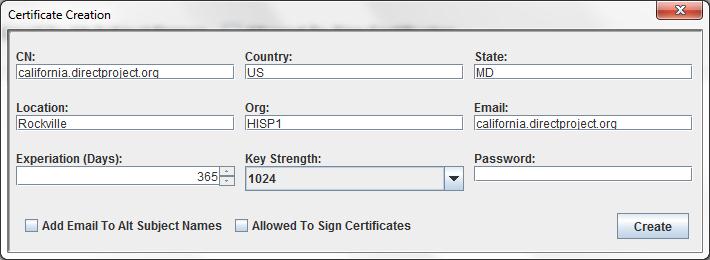
5.  Generate Certificates:

Execute  D:\DIRECT\tools\java -classpath .;./lib/* org.nhindirect.stagent.cert.tools.certgen.DirectProjectCertGenerator


Fill the form like below:
You can choose email and password, or you can leave them empty.
Click on Create.
Click OK.
Now click on Create Leaf Cert.
Now you can choose which kind of certificates you wanna generate.
   1. Organization Level Certificate.
   In this case, in the email field, input the domain name.
    2. Personal Level Certificate.
   In this case, in the email field, input the personal email address.

Now, we use Organization Level Certificate as example. Click on Create.


6.  start Tomcat
  1. cd D:\direct\apache-tomcat-7.0.23\bin
  2. startup.bat

7.  Config Service

Log into http://localhost:8081/config-ui with username:admin and password:adm1nD1r3ct


Click Create New Domain on
Domain Name: california.directproject.org
Postmaster: postmaster@california.directproject.org
Choose ENABLED as the status.
click Add


Click the Anchors tab.
select Certificate, for example, D:\direct\tools\california.directproject.org Root CA.der
Check Incoming and Outgoing.
Choose ENABLED as the status.
Click on Add Anchor
If you have other trusted direct network's CA, add their CA in trusted anchor. For example, I have added a trusted direct network: florida.directproject.org.
Click on Certificates.
Select p12 certificate, for example, D:\direct\tools\california.directproject.org.p12
Choose ENABLED as the status.
Click on Add Certificate
Click on DNS Entries.

The configuration here depends on the network configuration of your company. 
The "must" field to make direct project work is the "A" Record, "SOA" Record and "MX" Record.
Those are to config your DNS, and mail server.
In this example, I use two local computer "172.16.61.56" and "10.100.10.152" as the DNS server and mail server, and to simulate two direct network "california.directproject.org" and "florida.directproject.org". 
In this way, the configuration is as below:


Click on Agent Setting
Add setting key:PrivateStoreType with value:WS
Add setting key:AnchorStoreType with value:WS
Add setting key:PublicStoreType with value:DNS,WS
Add setting key:RawMessageSaveFolder with value:RawMsgFolder
Add setting key:IncomingMessageSaveFolder with value:IncomingMsgFolder
Add setting key:OutgoingMessageSaveFolder with value:OutgoingMsgFolder
Add setting key:DNSServerBindings with value:0.0.0.0
Add setting key:DNSServerPort with value:53       


8.  Install the Direct DNS Service

Windows Installation

The DNS server runs as Windows service on Windows deployments. To install as a service:
  1. Launch a command shell and navigate to the DirectDNSServer/bin directory.
  2. Run the command DirectDNSServer install
This will install as the server as a windows service that starts automatically on system boot up. You should be able to see the service in the Windows service control panel (services.msc).
To start the server, use one of the following methods:
  • Right click on the service in the service control panel and click start.
  • In a command shell, run the command DirectDNSServer start.
To stop the server, use one of the following methods:
  • Right click on the service in the service control panel and click stop.
  • In a command shell, run the command DirectDNSServer stop.
To uninstall the server:
  1. Stop the service using of the method described above.
  2. Launch a command shell and navigate to the DirectDNSServer/bin directory.
  3. Run the command DirectDNSServer remove
NOTE: The service runs as process named wrapper-windows-x86-32.exe. If for some reason the service hangs or will not stop, you can terminate it manually by killing this process.

Running Interactively

For debugging or troubleshooting purposes, you may need to run the service interactively. Running interactively is the same across all platforms.
  1. Open a terminal shell and navigate to the DirectDNSServer/bin directory.
  2. Run the command DirectDNSServer console.
The service will output all logging to the current console and the log file. To terminate the interactive service, simply press CTRL+C (Control C).

Service Deployment Configuration

The service deployment is configured using a file named wrapper.conf found in the ./conf directory of the service's directory structure. The service script files read this configuration file to set runtime attributes such as classpath, logging locations and thresholds, JVM arguments, and application arguments. The service itself is just a plain Java application, but is wrapped by a series of deployment classes that are intialized and launched by the service script.
The configuration file in most cases does not need a lot of modification, however there a few settings that will need adjustment depending on your deployment.
# Java Additional Parameters
wrapper.java.additional.1=-Djava.security.policy=conf/policy.all
wrapper.java.additional.2=-Dorg.apache.commons.logging.Log=org.apache.commons.logging.impl.SimpleLog
wrapper.java.additional.3=-Dorg.apache.commons.logging.simplelog.defaultlog=info
.
.
.
# Application parameters.  Add parameters as needed starting from 1
wrapper.app.parameter.1=org.nhindirect.dns.service.SimpleServiceRunner
wrapper.app.parameter.2=-p
wrapper.app.parameter.3=53
wrapper.app.parameter.4=-b
wrapper.app.parameter.5=0.0.0.0
wrapper.app.parameter.6=-u
wrapper.app.parameter.7=http://localhost:8081/config-service/ConfigurationService
wrapper.app.parameter.8=-m
wrapper.app.parameter.9=SERVER
Typical settings that may need adjustment.
SettingDescription
-Dorg.apache.commons.logging.simplelog.defaultlogThe logging threshold. Valid value:

fatal: Severe errors that cause premature termination
error: Other runtime errors or unexpected conditions.
warn: Use of deprecated APIs, poor use of API, 'almost' errors, other runtime situations that are undesirable or unexpected, but not necessarily "wrong".
info (default): Interesting runtime events such as startup/shutdown.
debug: Detailed information on flow of through the system.
trace: Even more detailed information such as entering and exiting methods.
wrapper.app.parameter.2=-pThe IP port that the DNS server will use for listening for DNS queries. The default is 53.
NOTE: Some operating systems may require the service to run with elevated account privileges to open ports in this range.
wrapper.app.parameter.4=-bThe IP addressed on the local machine that the service will bind to. Multiple IP addresses are separated with a comma. The default is 0.0.0.0 which means the service will bind to all IP addresses on the machine (including the loopback address of 127.0.0.1)
wrapper.app.parameter.6=-uThis is the URL of the location of the DNS records. Generally this will be the URL of the Direct Project configuration web service.
Some of these parameters can be over ridden with settings in the configuration service. See the protocol configuration for more details.

9.  Create Email Account

  1. start James
    1. cd D:\direct\james-2.3.2\bin
    2. run
  2. add user devdrfirst with password: drfirst
    telnet localhost 4555

    JAMES Remote Administration Tool 2.3.2
    Please enter your login and password
    Login id:
    root
    Password:
    root
    Welcome root. HELP for a list of commands
    adduser bo(username) XXX(psw)
    User bo added
10.  Replace JCE
  1. Replace US_export_policy.jar and local_policy.jar under ${JAVA_HOME}\jre\lib\security\ with Java Cryptography Extension (JCE) Unlimited Strength Jurisdiction Policy Files 6
    (US_export_policy.jar and local_policy.jar)
11. Config DNS of the local connection


12. Test the DNS configuration.
      
      Use Dig tool.
      Execute in cmd: 
      dig -t cert california.directproject.org
      Result should be:

      dig -t ns california.directproject.org
      Result should be:

      
 12. Configure the Email Client. Using Thunderbird.
Click on Continue and then click on Manual Config. Config like below.


And click on Done. Now you have setup your mailbox.

The procedure on the other machine "10.100.10.152" is the same.

Then, you can test your two direct network. Sending emails back and forth.

Reference:
http://wiki.directproject.org/Documentation+Library  (JAVA implementation Documents)