Showing posts with label Maven. Show all posts

8/26/2013

Maven assemble package and distribution

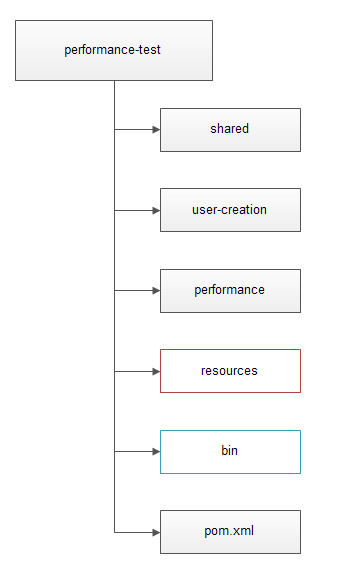
For example we have one project called "performance-test". And it has several modules, "shared", "user-creation", "performance" like below:


The parent pom.xml has modules:
<groupId>com.test</groupId>
<artifactId>performance-test</artifactId>
<version>1.0.0-SNAPSHOT</version>
<packaging>pom</packaging>

<name>performance-test</name>

<modules>
    <module>shared</module>
    <module>user-creation</module>
    <module>performance</module>
</modules>
While the modules is like:
<parent>
    <groupId>com.test</groupId>
    <artifactId>performance-test</artifactId>
    <version>1.0.0-SNAPSHOT</version>
    <relativePath>../pom.xml</relativePath>
</parent>

<artifactId>shared</artifactId>
<name>shared</name>


And the user-creation and performance module has several main classes that used to be separately executed to do the performance test.

First, for module "user-creation" and "performance", we need to package all dependencies into one executable jar file.(Simple way. We can also pick another way by copying all the dependencies to later lib folder and configure the classpath.)

Simply by configuring this plugin in pom.xml of "user-creation" and "performance":

<plugin>
 <groupId>org.apache.maven.plugins</groupId>
 <artifactId>maven-assembly-plugin</artifactId>
 <version>2.4</version>
 <configuration>
  <appendAssemblyId>true</appendAssemblyId>
 </configuration>
 <executions>
  <execution>
   <id>assemblyJar</id>
   <phase>package</phase>
   <goals>
    <goal>single</goal>
   </goals>
   <configuration>
    <descriptorRefs>
     <descriptorRef>jar-with-dependencies</descriptorRef>
    </descriptorRefs>
   </configuration>
  </execution>
 </executions>
</plugin>

In this way, we can get the executable jar files.

Extension:

When we have multiple modules and each module may have its own resources.We may want to put all the resources into one place that could make the property management easier and clearer.

For example, we may put the central resource folder under the parent project:


To support structure like this, we need one environment variable, for example, "resource.path" to tell the program where to find the central resource folder.

When we make the deployment, we can put the resources folder anywhere we want, as long as we define the variable.

We can define the variable in command line before we run the code.

-Dresource.path="C:/SOME_PATH"

Also, we can add it to system variable.

Extension:

To make the execution of jar easy, we can also write some bat files and put them into folder "bin" and put the folder under parent project, like below:
With this structure, after we make the build, we may want to get one instance folder which has structure like:

"bin": holds all the bat file.

"lib": holds all the jars.

"config": holds all the resources.

"log": holds all the log files, runtime generated.

"records": holds all the records generated by the code.
...

If all the code are put under one project instead of modules, we can easily get this by using the maven-assembly-plugin, configure it in the pom file of the project.

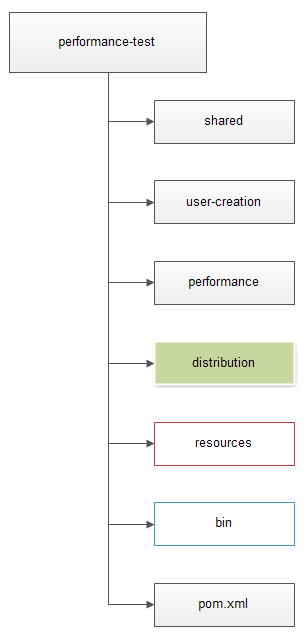
But when we have multiple modules and in the mean time, need to assemble libraries from different modules, we need to create another module "distribution" to access all the other sub-modules and assemble the instance folder.

The new structure of the project will be like:

The parent pom.xml will have modules:
<groupId>com.test</groupId>
<artifactId>performance-test</artifactId>
<version>1.0.0-SNAPSHOT</version>
<packaging>pom</packaging>

<name>performance-test</name>

<modules>
    <module>shared</module>
    <module>user-creation</module>
    <module>performance</module>
    <module>distribution</module>
</modules>

Because the parent pom is executed before all the modules' pom and the modules are built in sequence. So we have to define another module to make the final assemble.

The pom of the distribution will be like:

<parent>
 <groupId>com.test</groupId>
 <artifactId>performance-test</artifactId>
 <version>1.0.0-SNAPSHOT</version>
 <relativePath>../pom.xml</relativePath>
</parent>

<artifactId>distribution</artifactId>
<packaging>pom</packaging>
<name>distribution</name>

<url>http://maven.apache.org</url>
<properties>
 <project.build.sourceEncoding>UTF-8</project.build.sourceEncoding>
</properties>
<dependencies>
 <dependency>
  <groupId>com.test</groupId>
  <artifactId>user-creation</artifactId>
  <version>${project.version}</version>
 </dependency>
 <dependency>
  <groupId>com.test</groupId>
  <artifactId>performance</artifactId>
  <version>${project.version}</version>
 </dependency>
</dependencies>
<build>
 <directory>${basedir}/../instance</directory>
 <plugins>
  <plugin>
   <artifactId>maven-assembly-plugin</artifactId>
   <version>2.4</version>
   <executions>
    <execution>
     <id>distri-assembly</id>
     <phase>package</phase>
     <goals>
      <goal>single</goal>
     </goals>
     <configuration>
      <descriptors>
       <descriptor>${basedir}/../assemble/distribution-jar.xml</descriptor>
      </descriptors>
     </configuration>
    </execution>
   </executions>
  </plugin>
 </plugins>
</build>
We can see that we change the output directory of "distribution" to "%PARENT_PROJECT%/instance" by specify:
<directory>${basedir}/../instance</directory>

In this way, we will get the instance folder under the root of the parent project. This does not matter actually, we can also just leave it generated under target.

The distribution-jar.xml should be like:
<assembly
 xmlns="http://maven.apache.org/plugins/maven-assembly-plugin/assembly/1.1.2"
 xmlns:xsi="http://www.w3.org/2001/XMLSchema-instance"
 xsi:schemaLocation="http://maven.apache.org/plugins/maven-assembly-plugin/assembly/1.1.2 http://maven.apache.org/xsd/assembly-1.1.2.xsd">
 <id>bin</id>
 <formats>
  <format>dir</format>
  <format>zip</format>
 </formats>
 <includeBaseDirectory>false</includeBaseDirectory>
 <moduleSets>
  <moduleSet>

   <!-- Enable access to all projects in the current multimodule build! -->
   <useAllReactorProjects>true</useAllReactorProjects>

   <!-- Now, select which projects to include in this module-set. -->
   <includes>
    <include>${project.groupId}:user-creation</include>
    <include>${project.groupId}:performance</include>
   </includes>

   <binaries>
    <attachmentClassifier>jar-with-dependencies</attachmentClassifier>
    <outputDirectory>${basedir}/../lib</outputDirectory>
    <unpack>false</unpack>
   </binaries>

  </moduleSet>
 </moduleSets>
 <fileSets>
  <fileSet>
   <directory>${basedir}/../bin</directory>
   <outputDirectory>bin</outputDirectory>
   <filtered>true</filtered>
  </fileSet>
  <fileSet>
   <directory>${project.build.directory}/${project.artifactId}-${project.version}-bin/lib</directory>
   <outputDirectory>lib</outputDirectory>
  </fileSet>
  <fileSet>
   <directory>${basedir}/../resources</directory>
   <excludes>
    <exclude>keystore/*</exclude>
   </excludes>
   <outputDirectory>config</outputDirectory>
   <filtered>true</filtered>
  </fileSet>
  <fileSet>
   <directory>${basedir}/../resources/keystore</directory>
   <outputDirectory>config/keystore</outputDirectory>
   <filtered>false</filtered>
   <lineEnding>keep</lineEnding>
  </fileSet>
 </fileSets>
</assembly>

We can also add some small bat help file to project, so the final structure will be like:


QuickStart.bat:
mvn clean install -Dmaven.test.skip=true
pause
upgradeVersion.bat:
mvn versions:set -DnewVersion=%1

Caution: Maven binary file as resource should disable filter function.

In maven, sometimes when we use binary files as resources or assemble package from files that include binary files, like certificates, if we treat the binary file same as other resources, it may destroy the binary file.

First, the filter function of maven may destroy the binary file.

The description of filter function is in Maven Resource Document.
Basically,

Variables can be included in your resources. These variables, denoted by the ${...} delimiters, can come from the system properties, your project properties, from your filter resources and from the command line.
For example, if we have a resource src/main/resources/hello.txt containing
Hello ${name}
And a POM like this
<project>
  ...
  <name>My Resources Plugin Practice Project</name>
  ...
  <build>
    ...
    <resources>
      <resource>
        <directory>src/main/resources</directory>
      </resource>
      ...
    </resources>
    ...
  </build>
  ...
</project>
Upon calling
mvn resources:resources
This will create a resource output in target/classes/hello.txt which contains exactly the same text.
Hello ${name}
However, if we add a <filtering> tag to our POM and set it to true like this:
      ...
      <resource>
        <directory>src/main/resources</directory>
        <filtering>true</filtering>
      </resource>
      ...
Our target/classes/hello.txt after calling
mvn resources:resources
would be
Hello My Resources Plugin Practice Project
That's because the name variable was replaced by the value of the project's name (which was specified in the POM).
Moreover, we can also assign values through the command line using the "-D" option. For example, to change the value for the variable name to "world", we can simply invoke this command:
mvn resources:resources -Dname="world"
And the output in target/classes/hello.txt would be
Hello world

So we should understand that if we treat the binary file same as other resources, like configuration as below:
      ...
      <resource>
        <directory>src/main/resources</directory>
        <filtering>true</filtering>
      </resource>
      ...

Then when we run the program from the build, it'll throw exceptions when parse the binary file.

Instead, we should configure like this:
<resource>
    <directory>src/main/resources</directory>
    <excludes>
        <exclude>keystore/*</exclude>
    </excludes>
    <filtering>true</filtering>
 </resource>
 <resource>
    <directory>src/main/resources/keystore</directory>
    <filtering>false</filtering>
 </resource>


I see some questions are like "Generated Certificate Stops Working When Moved To Resources Folder"

Basically this is the reason.

Have fun.

Another place that we may face this issue is when we assemble the package.
In the assemble xml file, we need to include the binary file along with other resources into package.

For example:
<fileSets>
 <fileSet>
  <directory>${basedir}/../bin</directory>
  <outputDirectory>bin</outputDirectory>
  <filtered>true</filtered>
 </fileSet>
 <fileSet>
  <directory>${project.build.directory}/${project.artifactId}-${project.version}-bin/lib</directory>
  <outputDirectory>lib</outputDirectory>
 </fileSet>
 <fileSet>
  <directory>${basedir}/../resources</directory>
  <excludes>
   <exclude>keystore/*</exclude>
  </excludes>
  <outputDirectory>resources</outputDirectory>
  <filtered>true</filtered>
 </fileSet>
 <fileSet>
  <directory>${basedir}/../resources/keystore</directory>
  <outputDirectory>resources/keystore</outputDirectory>
  <filtered>false</filtered>
  <lineEnding>keep</lineEnding>
 </fileSet>
</fileSets>

In additional to the filter function, we can also set the lineEnding, directoryMode and fileMode to make sure the file will not be damaged when we make the assembling.


8/06/2013

Generate client object classes based on XML Schema ( .xsd files) (JAXB, Maven, Web Service)

To consume some xml based web services, sometimes we need to be able to generate java objects based on the schema that the service provider provides.

The JAXB is one tool that could help us do this and also JAXB is fully integrated with Maven.

Official Manual:
http://mojo.codehaus.org/jaxb2-maven-plugin/xjc-mojo.html

======================================================
======================================================

Example:

pom.xml:
<dependencies>
 <dependency>
   <groupId>junit</groupId>
   <artifactId>junit</artifactId>
   <version>4.10</version>
   <scope>test</scope>
 </dependency>
 <dependency>
   <groupId>javax.xml.bind</groupId>
   <artifactId>jaxb-api</artifactId>
   <version>2.1</version>
 </dependency>
 <dependency>
   <groupId>com.sun.xml.bind</groupId>
   <artifactId>jaxb-impl</artifactId>
   <version>2.1</version>
 </dependency>
</dependencies>

<build>
 <pluginManagement>
   <plugins>
     <plugin>
       <groupId>org.apache.maven.plugins</groupId>
       <artifactId>maven-compiler-plugin</artifactId>
       <version>2.3.1</version>
       <configuration>
         <source>1.6</source>
         <target>1.6</target>
       </configuration>
     </plugin>
   </plugins>
 </pluginManagement>
 <plugins>
   <plugin>
     <groupId>org.codehaus.mojo</groupId>
     <artifactId>jaxb2-maven-plugin</artifactId>
     <version>1.5</version>
     <configuration>
       <outputDirectory>${project.basedir}/src/main/java</outputDirectory>
       <schemaDirectory>${project.basedir}/src/main/schemas/</schemaDirectory>
       <bindingDirectory>${project.basedir}/src/main/schemas/bindings/</bindingDirectory>
       <extension>true</extension>
       <forceRegenerate>true</forceRegenerate>
     </configuration>
     <executions>
       <execution>
         <id>xjc-xxx</id>
         <goals>
           <goal>xjc</goal>
         </goals>
         <configuration>
           <schemaFiles>XXXXXXX.xsd</schemaFiles>
         </configuration>
       </execution>
     </executions>
   </plugin>
 </plugins>
</build>

5/28/2013

Maven Study Note: Jar Packaging and Installation (maven-assembly-plugin & maven-install-plugin)

Maven is so powerful. As a new comer, I believe I only explored the very basic level of usage of Maven.
One of the most frequent usages of Maven is its packaging function. Recently I did a little bit research on this part and make several tests.

Main cmd:  mvn clean install (-Dmaven.test.skip=true) everybody knows this...skip.

Besides the basic packaging function, there are a lot of extensions.

Package an executable jar with all the dependencies

<plugin>
 <groupId>org.apache.maven.plugins</groupId>
 <artifactId>maven-assembly-plugin</artifactId>
 <version>2.3</version>
 <executions>
   <execution>
     <id>assemblyApp</id>
     <phase>package</phase>
     <goals>
       <goal>single</goal>
     </goals>
     <configuration>
       <finalName>${project.artifactId}</finalName>
       <appendAssemblyId>true</appendAssemblyId>
       <archive>
         <manifest>
           <mainClass>
             com.test.commons.App
           </mainClass>
         </manifest>
       </archive>
       <descriptors>
         <descriptor>src/main/assembly/app-executable-jar.xml</descriptor>
         <descriptor>src/main/assembly/app-executable-artifact.xml</descriptor>
       </descriptors>
     </configuration>
   </execution>
 </executions>
</plugin>

app-executable-jar.xml:

<assembly
       xmlns="http://maven.apache.org/plugins/maven-assembly-plugin/assembly/1.1.0"
       xmlns:xsi="http://www.w3.org/2001/XMLSchema-instance"
       xsi:schemaLocation="http://maven.apache.org/plugins/maven-assembly-plugin/assembly/1.1.0 http://maven.apache.org/xsd/assembly-1.1.0.xsd">
   <id>with-dependencies</id>
   <formats>
       <format>jar</format>
   </formats>
   <includeBaseDirectory>false</includeBaseDirectory>
   <dependencySets>
       <dependencySet>
           <outputDirectory>/</outputDirectory>
           <useProjectArtifact>true</useProjectArtifact>
           <unpack>true</unpack>
           <scope>runtime</scope>
       </dependencySet>
   </dependencySets>
</assembly>

app-executable-artifact.xml:


<assembly
   xmlns="http://maven.apache.org/plugins/maven-assembly-plugin/assembly/1.1.0"
   xmlns:xsi="http://www.w3.org/2001/XMLSchema-instance"
   xsi:schemaLocation="http://maven.apache.org/plugins/maven-assembly-plugin/assembly/1.1.0 http://maven.apache.org/xsd/assembly-1.1.0.xsd">
   <id>bin</id>
   <formats>
       <format>dir</format>
       <format>zip</format>
   </formats>
   <includeBaseDirectory>false</includeBaseDirectory>
   <fileSets>
       <fileSet>
           <directory>${basedir}/src/main/assembly/app-bin</directory>
           <outputDirectory>/</outputDirectory>
           <filtered>true</filtered>
       </fileSet>
       <fileSet>
           <directory>${project.build.directory}</directory>
           <outputDirectory>/</outputDirectory>
           <includes>
               <include>${artifact.artifactId}-with-dependencies.jar</include>
           </includes>
       </fileSet>
   </fileSets>
</assembly>


In directory ${basedir}/src/main/assembly/app-bin, there is one batch file for execution:

Run.bat:

java -jar XXXXX(${artifact.artifactId})-with-dependencies.jar

Build Result:
In target:
there will be two jar files:
${project.artifactId}-${project.version}.jar
${project.artifactId}-with-dependencies.jar
there will be one zip file:
${project.artifactId}-bin.zip
there will be one directory, which holds the extracted files of the zip file.
${project.artifactId}-bin

If you do not want to specify main class. Then remove the archive config in the maven-assembly-plugin, and in Run.bat:

java -jar XXXXX(${artifact.artifactId})-with-dependencies.jar com.test.commons.App

Useful.

Sometimes, we may want to package the src to differect jar file for different support. In this case, we may want to realize flexible packaging using maven. Here comes the second scenario:

Package Src into different jar file, can customize to include/exclude any dependencies or class files.

For example, I want to develop one encryption and decryption service provider. For encryption consumer, I do not want to expose decryption method to them. And vise verse, for decryption consumer, I do not want to expose encryption method to them. So in this case, I need different jar file for encryption and decryption. And I do not want to separate the source code. Then we can config maven to surpport this kind of packaging.

To remove class in the jar file, we can use maven shade plugin, but personally I don't like it. I prefer maven assembly plugin because I think it is more flexible. Personal Opinion.

Here I only introduce the maven assembly plugin usage:

pom.xml

<?xml version="1.0" encoding="UTF-8"?>
<project xmlns="http://maven.apache.org/POM/4.0.0" xmlns:xsi="http://www.w3.org/2001/XMLSchema-instance"
   xsi:schemaLocation="http://maven.apache.org/POM/4.0.0 http://maven.apache.org/maven-v4_0_0.xsd">
   <modelVersion>4.0.0</modelVersion>
   <prerequisites>
       <maven>3.0.3</maven>
   </prerequisites>

   <properties>
       <java.version>1.6</java.version>
       <spring.version>3.1.0.RELEASE</spring.version>
       <commons-codec.version>1.6</commons-codec.version>
       <commons-lang.version>2.6</commons-lang.version>
       <jasypt.version>1.7.1</jasypt.version>
       <log4j.version>1.2.16</log4j.version>
       <log4j-extras.version>1.1</log4j-extras.version>
       <junit.version>4.8.2</junit.version>

       <sonar.host.url>
           http://localhost/sonar
       </sonar.host.url>

   </properties>

   <groupId>com.test.commons</groupId>
   <artifactId>test-common-security</artifactId>
   <packaging>jar</packaging>
   <version>1.0.0</version>
   <name>test-common-security</name>

   <dependencies>
       <dependency>
           <groupId>commons-codec</groupId>
           <artifactId>commons-codec</artifactId>
           <version>${commons-codec.version}</version>
       </dependency>
       <dependency>
           <groupId>org.springframework</groupId>
           <artifactId>spring-context</artifactId>
           <version>${spring.version}</version>
       </dependency>


       <dependency>
           <groupId>log4j</groupId>
           <artifactId>log4j</artifactId>
           <version>${log4j.version}</version>
       </dependency>
       <dependency>
           <groupId>log4j</groupId>
           <artifactId>apache-log4j-extras</artifactId>
           <version>${log4j-extras.version}</version>
       </dependency>
       <dependency>
           <groupId>org.jasypt</groupId>
           <artifactId>jasypt</artifactId>
           <version>${jasypt.version}</version>
       </dependency>
       <dependency>
           <groupId>commons-lang</groupId>
           <artifactId>commons-lang</artifactId>
           <version>${commons-lang.version}</version>
       </dependency>
       <dependency>
           <groupId>junit</groupId>
           <artifactId>junit</artifactId>
           <version>${junit.version}</version>
           <scope>test</scope>
       </dependency>
       <dependency>
           <groupId>org.springframework</groupId>
           <artifactId>spring-test</artifactId>
           <version>${spring.version}</version>
           <scope>test</scope>
       </dependency>
   </dependencies>

   <build>
       <plugins>
           <plugin>
               <groupId>org.apache.maven.plugins</groupId>
               <artifactId>maven-compiler-plugin</artifactId>
               <version>2.3.1</version>
               <configuration>
                   <source>${java.version}</source>
                   <target>${java.version}</target>
               </configuration>
           </plugin>

           <plugin>
               <groupId>org.apache.maven.plugins</groupId>
               <artifactId>maven-source-plugin</artifactId>
               <version>2.1.2</version>
           </plugin>

           <plugin>
               <groupId>org.codehaus.mojo</groupId>
               <artifactId>sonar-maven-plugin</artifactId>
               <version>2.0</version>
           </plugin>

           <plugin>
               <groupId>org.apache.maven.plugins</groupId>
               <artifactId>maven-assembly-plugin</artifactId>
               <version>2.3</version>
               <executions>
                   <execution>
                       <id>assemblyEncoder</id>
                       <phase>package</phase>
                       <goals>
                           <goal>single</goal>
                       </goals>
                       <configuration>
                           <finalName>${project.artifactId}</finalName>
                           <appendAssemblyId>true</appendAssemblyId>
                           <archive>
                               <manifest>
                                   <mainClass>
                                       com.test.commons.security.EncoderApp
                                   </mainClass>
                               </manifest>
                           </archive>
                           <descriptors>
                               <descriptor>src/main/assembly/encoder-executable-jar.xml</descriptor>
                               <descriptor>src/main/assembly/encoder-executable-artifact.xml</descriptor>
                           </descriptors>
                       </configuration>
                   </execution>

                   <execution>
                       <id>assemblyKeyPairGen</id>
                       <phase>package</phase>
                       <goals>
                           <goal>single</goal>
                       </goals>
                       <configuration>
                           <finalName>${project.artifactId}</finalName>
                           <appendAssemblyId>true</appendAssemblyId>
                           <archive>
                               <manifest>
                                   <mainClass>
                                       com.test.commons.security.util.KeyPairGenApp
                                   </mainClass>
                               </manifest>
                           </archive>
                           <descriptors>
                               <descriptor>src/main/assembly/keypairgen-executable-jar.xml</descriptor>
                               <descriptor>src/main/assembly/keypairgen-executable-artifact.xml</descriptor>
                           </descriptors>
                       </configuration>
                   </execution>

                   <execution>
                       <id>assemblyEncryptionJar</id>
                       <phase>package</phase>
                       <goals>
                           <goal>single</goal>
                       </goals>
                       <configuration>
                           <finalName>${project.artifactId}</finalName>
                           <appendAssemblyId>true</appendAssemblyId>
                           <descriptors>
                               <descriptor>src/main/assembly/encryption-jar.xml</descriptor>
                           </descriptors>
                       </configuration>
                   </execution>

                   <execution>
                       <id>assemblyDecryptionJar</id>
                       <phase>package</phase>
                       <goals>
                           <goal>single</goal>
                       </goals>
                       <configuration>
                           <finalName>${project.artifactId}</finalName>
                           <appendAssemblyId>true</appendAssemblyId>
                           <descriptors>
                               <descriptor>src/main/assembly/decryption-jar.xml</descriptor>
                           </descriptors>
                       </configuration>
                   </execution>

               </executions>
           </plugin>

           <plugin>
               <groupId>org.apache.maven.plugins</groupId>
               <artifactId>maven-install-plugin</artifactId>
               <version>2.4</version>
               <executions>
                   <execution>
                       <id>install-encryption</id>
                       <phase>package</phase>
                       <goals>
                           <goal>install-file</goal>
                       </goals>
                       <configuration>
                           <file>target/${project.artifactId}-encryption-${project.version}.jar</file>
                           <groupId>${project.groupId}</groupId>
                           <artifactId>${project.artifactId}-encryption</artifactId>
                           <version>${project.version}</version>
                           <packaging>jar</packaging>
                       </configuration>
                   </execution>

                   <execution>
                       <id>install-decryption</id>
                       <phase>package</phase>
                       <goals>
                           <goal>install-file</goal>
                       </goals>
                       <configuration>
                           <file>target/${project.artifactId}-decryption-${project.version}.jar</file>
                           <groupId>${project.groupId}</groupId>
                           <artifactId>${project.artifactId}-decryption</artifactId>
                           <version>${project.version}</version>
                           <packaging>jar</packaging>
                       </configuration>
                   </execution>

               </executions>
           </plugin>

       </plugins>
   </build>

   <reporting>
       <plugins>
           <plugin>
               <groupId>org.apache.maven.plugins</groupId>
               <artifactId>maven-surefire-report-plugin</artifactId>
               <version>2.12</version>
           </plugin>
       </plugins>
   </reporting>
</project>


The assemblyEncryptionJar and assemblyDecryptionJar execution in assembly plug in, package the src to different  jar files for encryption and decryption.

encryption-jar.xml

<assembly
   xmlns="http://maven.apache.org/plugins/maven-assembly-plugin/assembly/1.1.0"
   xmlns:xsi="http://www.w3.org/2001/XMLSchema-instance"
   xsi:schemaLocation="http://maven.apache.org/plugins/maven-assembly-plugin/assembly/1.1.0 http://maven.apache.org/xsd/assembly-1.1.0.xsd">
   <id>encryption-${project.version}</id>
   <formats>
       <format>jar</format>
   </formats>
   <includeBaseDirectory>false</includeBaseDirectory>
   <dependencySets>
       <dependencySet>
           <outputDirectory>/</outputDirectory>
           <useProjectArtifact>true</useProjectArtifact>
           <includes>
               <include>${project.groupId}:${project.artifactId}</include>
           </includes>
           <unpack>true</unpack>
           <unpackOptions>
               <excludes>
                   <exclude>com/test/commons/security/text/TextDecryptor.class</exclude>
                   <exclude>com/test/commons/m/aes/AESDecryptor.class</exclude>
               </excludes>
           </unpackOptions>
           <scope>runtime</scope>
       </dependencySet>
   </dependencySets>
</assembly>


Basically, we add dependency ${project.groupId}:${project.artifactId}, unpack it, exclude several classes that we do not want to add.

decryption-jar.xml

<assembly
   xmlns="http://maven.apache.org/plugins/maven-assembly-plugin/assembly/1.1.0"
   xmlns:xsi="http://www.w3.org/2001/XMLSchema-instance"
   xsi:schemaLocation="http://maven.apache.org/plugins/maven-assembly-plugin/assembly/1.1.0 http://maven.apache.org/xsd/assembly-1.1.0.xsd">
   <id>decryption-${project.version}</id>
   <formats>
       <format>jar</format>
   </formats>
   <includeBaseDirectory>false</includeBaseDirectory>
   <dependencySets>
       <dependencySet>
           <outputDirectory>/</outputDirectory>
           <useProjectArtifact>true</useProjectArtifact>
           <includes>
               <include>${project.groupId}:${project.artifactId}</include>
           </includes>
           <unpack>true</unpack>
           <unpackOptions>
               <excludes>
                   <exclude>com/test/commons/security/BasicAuthUtil.class</exclude>
                   <exclude>com/test/commons/security/Encoder.class</exclude>
                   <exclude>com/test/commons/security/EncoderApp.class</exclude>
                   <exclude>com/test/commons/security/EncryptionSSOConfig.class</exclude>
                   <exclude>com/test/commons/security/EncryptionSSOException.class</exclude>
                   <exclude>com/test/commons/security/EncryptionSSOUtil.class</exclude>
                   <exclude>com/test/commons/security/util/*</exclude>
                   <exclude>com/test/commons/security/text/TextEncryptor.class</exclude>
                   <exclude>com/test/commons/security/aes/AESEncryptor.class</exclude>
               </excludes>
           </unpackOptions>
           <scope>runtime</scope>
       </dependencySet>
   </dependencySets>
</assembly>

In this way, five jar files will be generated.

-test-common-security-2.0.1.jar
-test-common-security-encryption-2.0.1.jar
-test-common-security-decryption-2.0.1.jar
-test-common-security-with-dependencies.jar
-test-common-security-keypairgen-with-dependencies.jar

two zip files will be generated:
-test-common-security-bin.zip
-test-common-security-keypairgen-bin.zip

two directory will be generated:
-test-common-security-bin
-test-common-security-keypairgen-bin

To install test-common-security-encryption-2.0.1.jar and test-common-security-decryption-2.0.1.jar into maven's repository and into specified folder. We need to config the installation of maven using maven install plugin. Configuration as above.

Useful Reference:
http://maven.apache.org/plugins/maven-install-plugin/install-file-mojo.html

The maven official manual book is enough and if you read the component of maven plugins, you can easily find out ways to config maven based on your own requirement.